

Checking the Word Count
In this guide, you'll learn how to check the word count in MobiDocs. You can see the totals for a whole document or for a section you select, which is useful when you write to a limit, such as an essay, an abstract, or a job application. The word count also shows characters, paragraphs, and sections. The steps start with Windows, followed by shorter sections for Mac, Android, and iOS.
Before you begin
Make sure you have:
MobiOffice installed on your device. See Installing MobiOffice on multiple devices.
A document open in MobiDocs. See Creating and editing documents.
Check the word count for a whole document
1. Open your document in MobiDocs.
2. In the quick access toolbar, click Review.
3. Click Word Count.
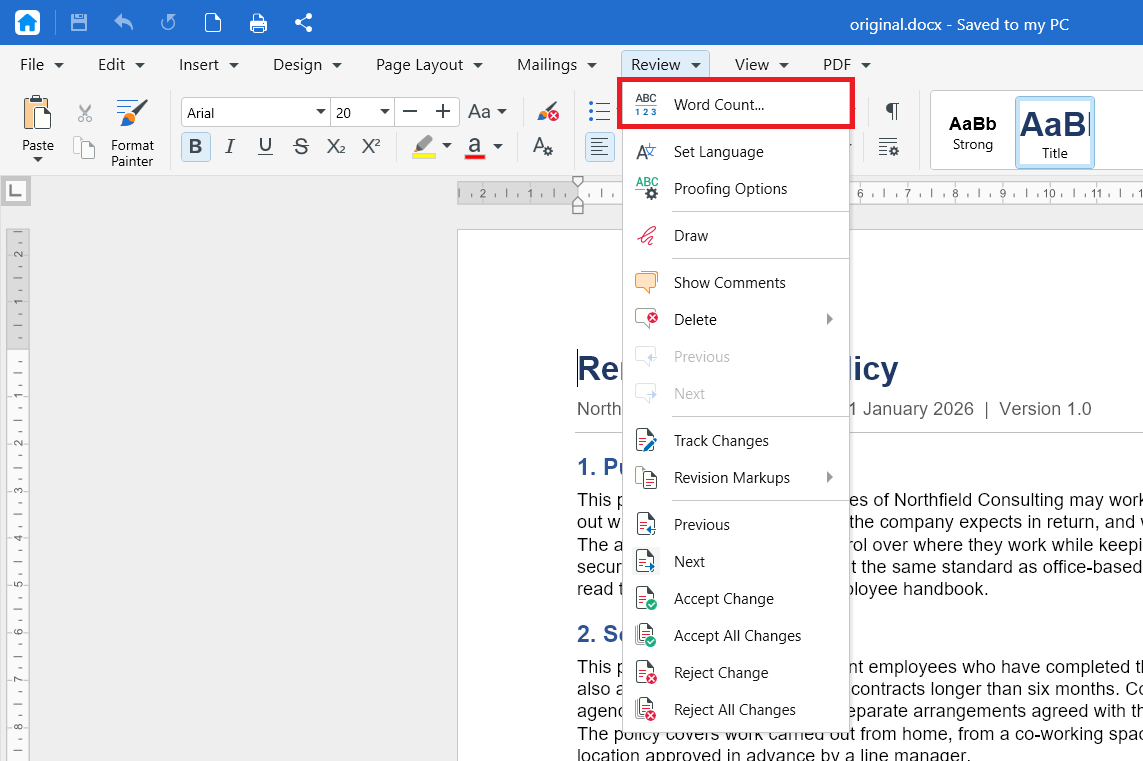
4. Alternatively, you can Click on the word count found on the lower toolbar to open the word count without using the menu.

The word count opens and shows the totals for your document.
Check the word count for selected text
Use this when you only need the count for one paragraph, section, or passage.
1. Select the text you want to count.
2. In the ribbon, click Review.
3. Click Word Count.
The totals shown apply only to the text you selected.
What the word count shows
To learn more about sections, see Setting up custom page layouts.
Check the word count on Mac
1. Open your document in MobiDocs.
2. In the ribbon, click Review.
3. Click Word Count.
Check the word count on Android and iOS
On phones and tablets, MobiDocs is part of the MobiOffice app.
1. Open your document in the MobiOffice app.
2. Tap Edit.
3. From the tabs menu, tap on Review and then tap Word Count.
Troubleshooting
The Word Count option is greyed out. Click inside the document first. If the document opened in read-only mode, switch to editing mode.
The count is lower than I expected. You may still have text selected. Click once anywhere in the document to clear the selection, then check the count again.
My count doesn't match another app. Word processors differ in how they treat items such as numbers, hyphenated words, and text in headers or footnotes. Small differences between apps are normal, so use one app as your reference when you write to a strict limit.
Where to go next
You now know how to check the word count in MobiDocs. Try one of these next:


